Streamlining My CLI Tool Development with GitHub Actions
Introduction
I recently embarked on a journey to enhance a personal project: my CLI tool, Command Assist. As part of this journey, I implemented Continuous Integration (CI) and Continuous Deployment (CD) to streamline the development process. Here’s a look at what I’ve learned, how I set up CI/CD, and why it’s been a game-changer for my project.
What is CI/CD?
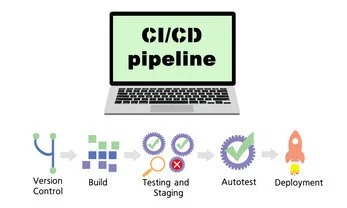
CI (Continuous Integration) and CD (Continuous Deployment) are practices designed to automate and streamline the software development lifecycle. By integrating these practices, I’ve been able to detect issues earlier, release features faster, and maintain high-quality code.
 Release Workflow
Benefits of CI/CD
- Early Bug Detection: Automated tests help catch bugs before they make it to production, reducing the risk of defects.
- Faster Releases: Automation accelerates the release process, getting new features and fixes to users more quickly.
- Higher Quality: Regular testing and validation ensure that the software remains reliable and robust.
- Continuous Feedback: CI/CD processes facilitate rapid feedback from users, helping to build better products.
A Closer Look at the Command Assist Release Process
For Command Assist, I wanted a streamlined release process that ensured my tool was always in top shape. Here’s an overview of how I set it up.
 Release Flow
The Release Flow
Development Pre-Merge
- Development: Work on new features and fixes in separate branches.
- Pull Requests: Submit PRs for code reviews.
- Pre-Merge CI Checks: Automated checks for linting, security, static analysis, and type errors.
 Pre-merge Flow
Release Post-Merge
- PR Review: After the automated checks pass, the PR is manually reviewed. If any issues are found, additional commits are made before merging.
- Post-Merge CI Checks: Once the PR is merged into the
mainbranch, additional linting and testing are run to ensure everything is stable. - Automated Release:
- After a PR is merged into
main, an automated process triggers a release. - This includes:
- Changelog Generation: A changelog is automatically generated based on the changes merged.
- Version Bump: The version number is incremented according to semantic versioning.
- Tagging and Publishing: The commit is tagged with the new version, and the updated package is published to PyPI.
- Cleanup: Any temporary branches created during the process are deleted.
- After a PR is merged into
 Post-merge Flow
Technical Details and Snippets
Why I Chose Poetry for Dependency Management
For managing dependencies and versioning in the Command Assist project, I opted for Poetry. Poetry stands out for its robust, all-in-one approach to dependency management and packaging in Python. Here’s why:
- Integrated Dependency Management : Poetry simplifies the management of dependencies and their versions, eliminating the need for separate tools and configuration files. This makes it easier to keep track of package requirements and ensures consistent environments across different setups.
- Built-in Versioning: Poetry includes built-in support for versioning, which streamlines the release process. It handles version bumps and package metadata updates in a straightforward manner, which helps to maintain clarity and reduce manual errors.
- Streamlined Workflow: With Poetry, the process of creating, managing, and publishing packages becomes more cohesive. It integrates seamlessly with tools like PyPI for package distribution, making it easier to manage releases and deployments.
Static analysis Linting and Quality Checks
Code Quality with Flake8
I use several tools to ensure code quality: Flake8: Checks for style violations and potential errors.
- name: Run flake8
  run: |
    poetry run flake8 cmd_assist tests
  shell: bash
Code Security with Bandit
Bandit: Analyzes code for security issues.
- name: Run bandit
  run: |
    poetry run bandit -r cmd_assist
  shell: bash
Type checking with Mypy
Mypy: Performs type checking to catch type errors.
- name: Run mypy
  run: |
    poetry run mypy cmd_assist tests
  shell: bas
Checking Dependency Vulnerabilities with Dependabot
version: 2
updates:
  - package-ecosystem: "pip"
    directory: "/"
    schedule:
      interval: "daily"
    commit-message:
      prefix: "chore"
Testing Across Python Versions
Multiple python versions tested
Matrix strategy Using a matrix strategy, I run tests across multiple Python versions to ensure compatibility:
strategy:
  matrix:
    python-version: [3.9, 3.10, 3.11, 3.12]
Version Bumping and Tagging
To keep versions in sync, I automate version bumps and tag creation:
- name: Bump version and create a tag
  id: bump_and_tag
  run: |
    # Bump version
    poetry version patch

    # Get new version
    NEW_VERSION=$(poetry version -s)
    # Create a temp branch for version tagging
    TEMP_BRANCH="release-$NEW_VERSION"
Publishing to PyPI
Finally, I publish the release to PyPI to make it available for users:
- name: Publish to PyPI
  run: |
    poetry config repositories.pypi https://upload.pypi.org/legacy/
    poetry config pypi-token.pypi ${{ secrets.PYPI_TOKEN }}
    poetry publish --build --repository pypi
  env:
    # github secrets used
    PYPI_TOKEN: ${{ secrets.PYPI_TOKEN }}
    GITHUB_TOKEN: ${{ secrets.PAT_TOKEN }}
  shell: bash
What are GitHub Secrets?
GitHub secrets are encrypted environment variables that you can use to store sensitive information such as API tokens, passwords, or other credentials securely. They are accessible only within the scope of your workflows and cannot be exposed through logs or UI.
In my CI/CD pipeline, i use GITHUB_SECRETS to handle sensitive tokens like PYPI_TOKEN for PyPI publishing and GITHUB_TOKEN for GITHUB operations. GitHub Secrets provide a secure way to store and manage these credentials. For those new to GitHub Actions, Github provides detailed documentation on managing secrets which explains how to add and use secrets to your workflows. This ensures tokens are kept secure and are only accessible where needed.
Testing Locally with Act
Before pushing changes to GitHub, you can test your GitHub Actions workflows locally using the tool act. act simulates GitHub Actions workflows on your local machine, allowing you to debug and verify your setup without needing to trigger runs on GitHub. This can significantly speed up your development process by catching issues early and ensuring your workflows are correctly configured before committing them.
Plug for my Command assist tool :) — what is the command for running act
 Using act
Embracing CI/CD with GitHub
Having worked with CI/CD for years, it’s clear that these practices are now standard in modern development. What stands out with GitHub Actions is its simplicity and seamless integration compared to other CI/CD platforms I’ve used. GitHub’s user-friendly interface and native support for automating workflows make it incredibly efficient to set up and manage continuous integration and deployment processes. This ease of use not only accelerates development but also enhances productivity, allowing me to focus more on writing code and less on managing infrastructure. For anyone looking to streamline their development pipeline, GitHub Actions offers a powerful, accessible solution that aligns well with today’s best practices